.svg)
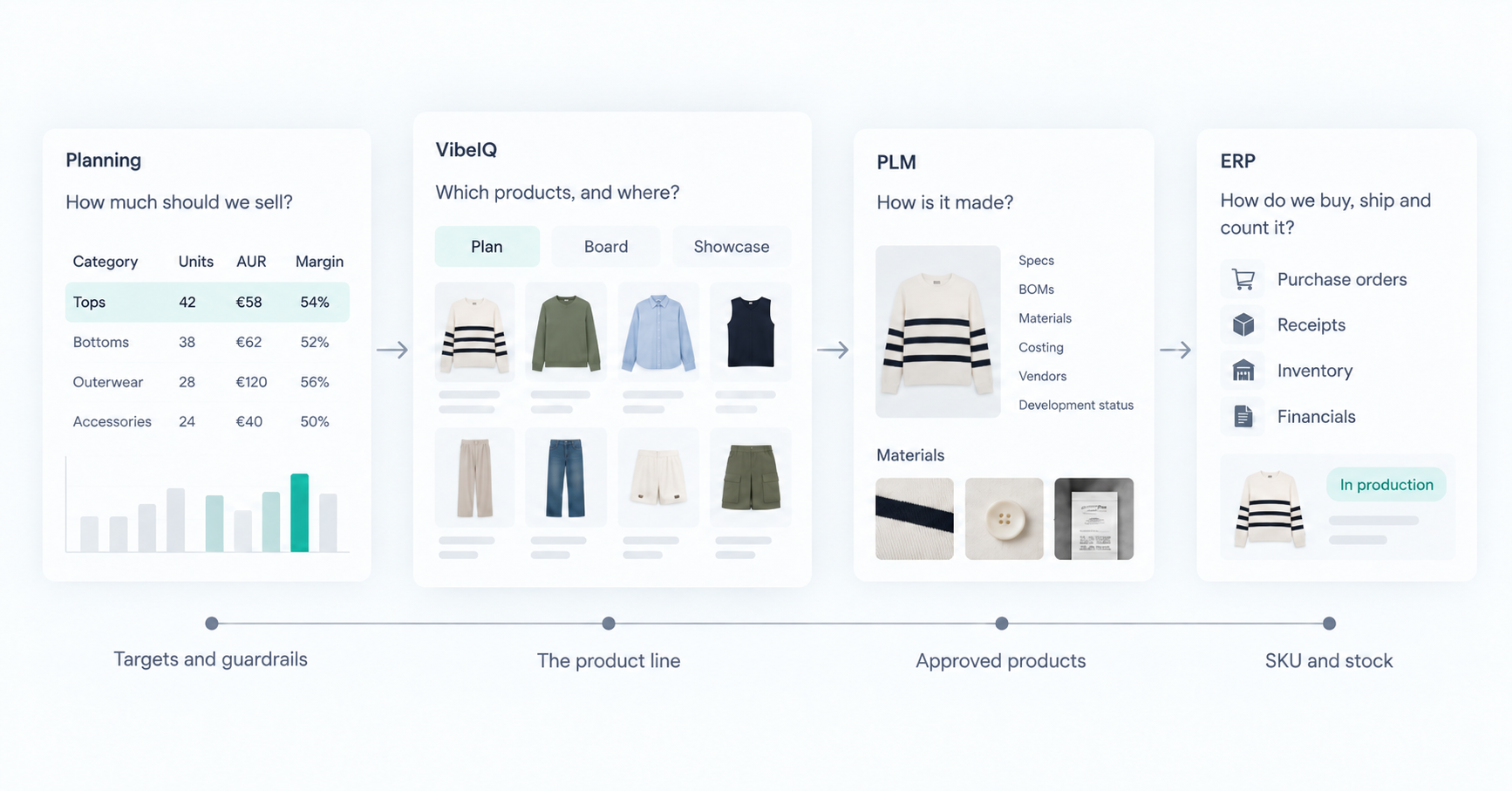
A range plan can be finished, approved and financially sound while containing zero real products. "42 tops for EMEA, €58 AUR, 54% margin, Fall." The numbers tie. Someone still has to turn them into the right 42 tops: a price ladder that works, enough newness, nothing that cannibalizes the style next to it, and a version of all that for every region and channel.
That isn't a calculation, so planning software doesn't do it. It isn't product development, so PLM doesn't either. At most brands it happens in spreadsheets, decks and Miro boards, then gets re-keyed into the systems of record. VibeIQ is where that line gets built, with the plan in view the whole time. New Balance, for one, now sees its line about 16 weeks earlier.
If you run IT or own the product data architecture, your next question is fair: where does this sit next to the planning, PLM and ERP systems you already pay for?
Stop asking "what's the source of truth?"
One seasonal product has several truths at once. The merchant decides it belongs in the line. PLM holds its spec and BOM. The planning system owns its forecast. ERP owns the purchase order and the stock count. None of these compete, because they're different objects at different stages.
The better question is: which system authors this piece of data, at this point in the season? Answer that per object and most integration arguments go away.
Who owns what today
| System | The question it answers | What it owns |
|---|---|---|
| Planning (MFP, assortment) | How much should we sell? | Revenue, margin and unit targets, open-to-buy, option counts, demand and size-level forecasts |
| VibeIQ | Which products, and where? | The evolving line: placeholders, items and options, assortment decisions, regional and channel adoption, product visuals in context |
| PLM | How is it made? | Specs, BOMs, points of measure, materials, sourcing, costing, factory and vendor workflows |
| ERP | How do we buy, ship and count it? | Purchase orders, receipts, inventory, operational financials |
The edges blur. Some PLMs ship visual boards, and some planning tools handle placeholders. What matters is that the decision about which products make the line has one home, where merchandising, design, regional and development teams share the same live data.
What happens inside VibeIQ
VibeIQ runs on one product data model shared by three apps: Plan, Board and Showcase.
A merchant starts in Plan, often with placeholders: slots that carry a target price, margin and quantity before any design exists. When design lands on a product, the placeholder is promoted to a real item with options (colorways). When the merchant publishes the plan, the linked assortment updates, and every Board and Showcase built on that assortment picks up the change. Drop ten styles in the morning and the design boards and regional presentations flag it straight away.
A few rules matter to anyone mapping data:
- Item-level properties, like a name or primary image, update across every app immediately.
- Assortment-level changes, like adds, drops and regional quantities, move when the plan is published. That separates work in progress from committed decisions, with version history behind it.
- Visual flags such as "dropped" on a board are annotations. They don't change assortment data.
Regional and channel teams adopt from the global line in their own child plans, add local range where allowed, and their forecasts roll back up. Planning targets already sit alongside the line, and an update due by the end of 2026 shows target, on-plan and gap for each segment, with placeholders pre-filled to close the gaps.
What moves between the systems
You don't need to sync everything. You need the handoffs that cause rework today.
| Handoff | What typically moves |
|---|---|
| Planning → VibeIQ | Season and category keys; option-count, price and margin targets; region and channel dimensions |
| VibeIQ → PLM | Approved products and colorways, key attributes, primary image, season assignment |
| PLM → VibeIQ | Costing and development status, so merchants can check margin without leaving the line |
| VibeIQ → Planning | The committed assortment, regional and channel selections, early style-color forecasts |
| PLM or MDM → ERP | Released product and SKU master data, through the route you already use |
Note the last row. VibeIQ rarely needs a direct line to ERP. Product data usually gets there through PLM, MDM or middleware already.
One product, from plan to production
A footwear team starts the season with a category target in its planning system. In VibeIQ, one slot in that plan begins as a placeholder. Design develops a shoe for it, the placeholder becomes an item, and the merchant reviews it next to the rest of the line.
The merchant confirms it and publishes. The product is created in PLM at the agreed stage gate, and development takes over. In footwear, the factory usually does the technical design, while PLM tracks the last, materials, spec and cost.
Then the cost comes back over target. That number flows back into VibeIQ, where the merchant can keep the shoe, change the retail price, swap in another option or drop it. Whatever they decide goes out as a structured update, not a slide someone has to interpret.
Once the line is committed, planning gets the actual products to forecast depth and size the buy. Size and width curves stay in your planning tools, and ERP turns the buy into purchase orders.
The loop is what counts. A cost or regional change can reopen a decision, and your systems should handle that without a week of reconciliation.
Start with the smallest integration that fixes a real handoff
Nobody needs a big-bang integration on day one. VibeIQ rollouts usually phase it:
- Crawl. Load planning targets and product data with loader files or a one-way sync, build the assortment in VibeIQ, and export a structured, decided line.
- Walk. Automate the handoff that causes the most rework. Usually that's product creation into PLM and cost coming back.
- Run. Move to event-driven, two-way sync for core entities and widen coverage as the process settles.
It doesn't have to be slow, either. New Balance had its first VibeIQ app running in about three months.
VibeIQ has out-of-the-box, two-way connectors for PTC FlexPLM, Bamboo Rose and other systems, running in production with customers today. Customers already connect to Centric through its API, scoped to their setup. For everything else there's an API, SDKs and configurable event workflows with automatic retry.
Two habits keep it clean. Pick one creation direction per entity, so the same colorway is never created in two places. And sync instance data, not schemas. VibeIQ deliberately doesn't copy your PLM's data model.
What IT has to support
VibeIQ is cloud-native SaaS on AWS, and it's SOC 2 Type II compliant. Updates ship about every three weeks with zero downtime. There's no upgrade project to schedule and no version to fall behind on.
Integrations run on a documented API and SDKs, not one-off scripts. Instance configuration can be kept as code and promoted across environments through your own CI/CD pipeline, so changes are reviewed and versioned like the rest of your stack.
What VibeIQ doesn't replace
- Merchandise financial planning, demand planning and open-to-buy. VibeIQ consumes targets and hands back a decided line. (More on that in using VibeIQ and your planning tool together.)
- PLM development. Sourcing, compliance and vendor workflows stay in PLM.
- ERP. Purchasing, inventory and receipts stay where they are.
- Allocation and replenishment. Those stay with your planning and allocation tools.
What VibeIQ does replace is the pile of spreadsheets, decks and copied boards teams use to decide the line today, most of it stale before the meeting starts.
A short checklist for IT
- Agree canonical IDs for seasons, styles and colorways, and who issues them.
- Decide field ownership per object, not per system.
- Treat publish as the gate between draft work and committed data.
- Set expected latency for each handoff. Batch is fine for targets; product changes may need events.
- Plan for failure: acknowledgments, rejects, retries and a regular reconciliation check.
- Decide which files and decks become outputs, and stop people editing them.
Want to see how this would work with your PLM and planning stack?