

Skip to content
Assortment Management Software

Build an assortment where every product earns its place.

Decide what to carry over, where to add newness and which options to drop. Bring product imagery, prices and key attributes together so your team can evaluate each choice in the context of the assortment.

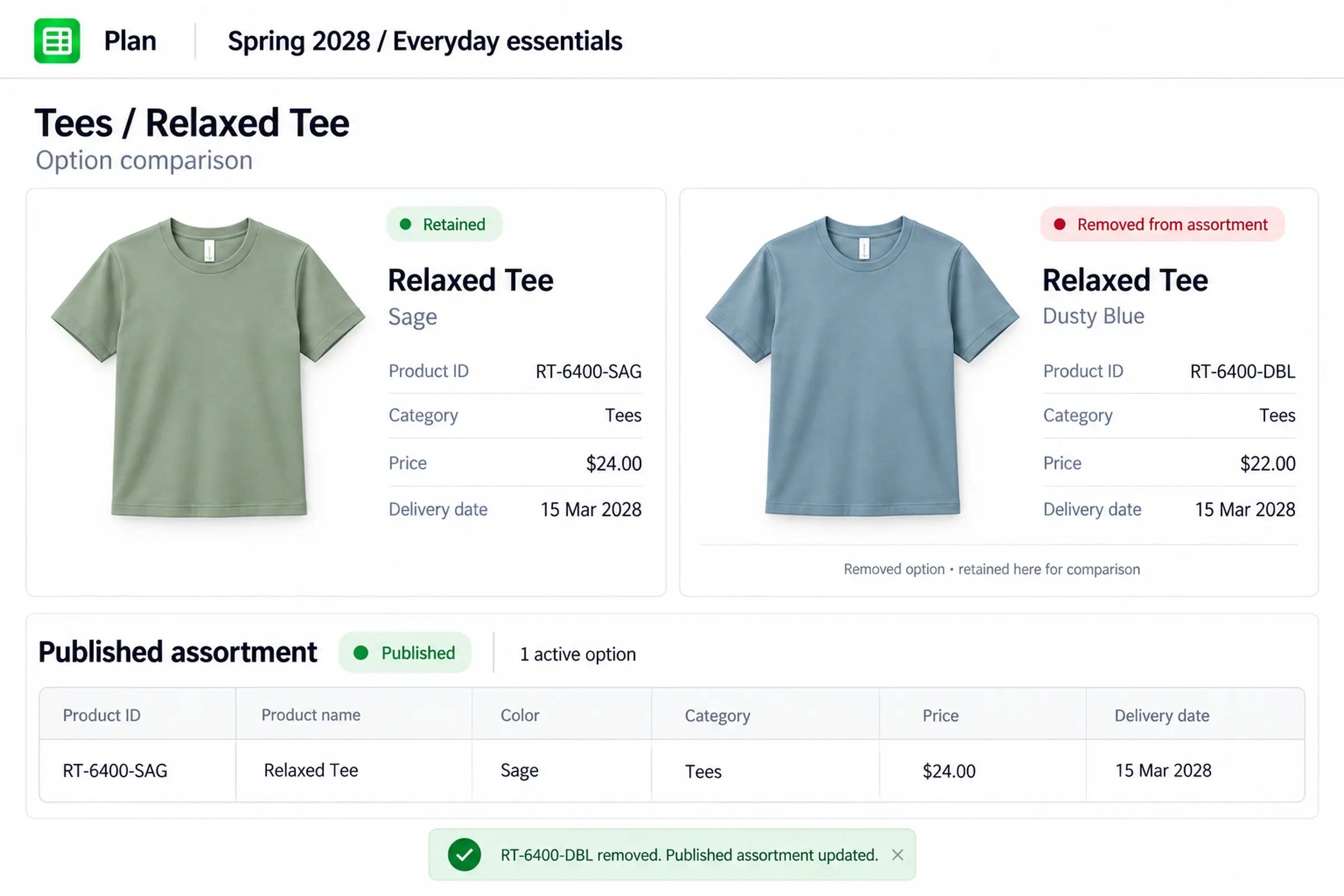
Option comparison in Plan for the Relaxed Tee: the Sage option is retained and Dusty Blue is removed, and the published assortment now lists one active option, RT-6400-SAG.

Turn open product needs into concrete options.

Build your assortment from early product needs to developed concepts, keeping product records, imagery, and assortment membership connected throughout.

Start with placeholders

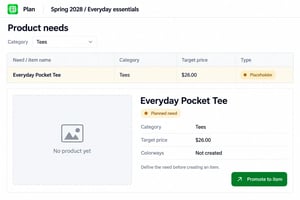
Define upcoming product needs with category, target price, and key attributes.

A planned need in Plan: the Everyday Pocket Tee placeholder, with category Tees and a $26.00 target price, ready to promote to an item.
Develop products with colorways

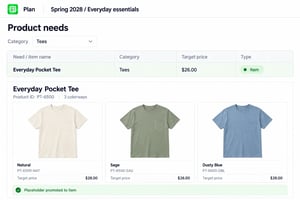
Promote selected placeholders into products and build out their available colorway options.

After Promote, the Everyday Pocket Tee is an item with three colorway options: Natural, Sage and Dusty Blue.

See how every product fits the mix.

Review product imagery and key attributes, then filter and compare similar options to spot gaps, overlaps, and opportunities across your assortment.

Explore your assortment

Filter products by category and compare imagery, pricing, color, and newness in one view.

The Spring 2028 Everyday essentials assortment in Plan filtered to Tees, showing six options with imagery, price, color, category and Carryover or New labels.
Identify overlapping options

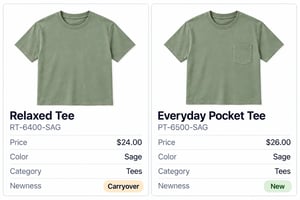
Compare similar products side by side to spot competing options and uncover assortment gaps.

Two Sage tees serving a similar role: the carryover Relaxed Tee at $24.00 and the new Everyday Pocket Tee at $26.00.

Make line reviews count with less preparation

vera_bradley_logo@2xC
10% fewer SKUs before sampling

Vera Bradley reports that reviewing the seasonal assortment together helped teams identify and remove unnecessary options before sampling.

Kizik_Logo@2xC
Line prep from 1 week to 1 day

Kizik reports cutting preparation for a key line-plan milestone from roughly a week to a day or less by bringing product visuals and details together.

Make changes directly in your assortment.

Update product details, add or remove options, and publish changes so connected boards reflect the latest assortment.

Refine your product selection

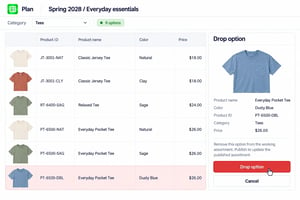
Update product details and drop options that no longer belong in the line.

In Plan, the Dusty Blue Everyday Pocket Tee (PT-6500-DBL) is selected in a Drop option panel, ready to remove from the working assortment.
Keep connected boards in sync

Publish your revised assortment and refresh connected lineboards to bring them up to date.

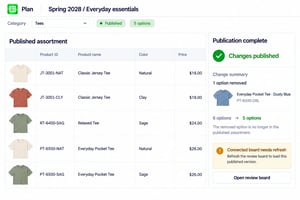
Publication complete: the published assortment now lists five options, with the Dusty Blue Everyday Pocket Tee removed and a note that the connected board needs refreshing.

Give regional teams a connected starting point.

Create regional and channel assortments from a shared source, giving local teams flexibility to select products while staying connected to the global line.

Start with a global assortment

Maintain a shared source assortment that regional teams can build from.

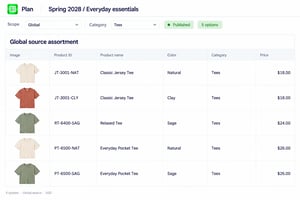
The published global source assortment for Spring 2028 Everyday essentials in Plan, listing five tee options with their product IDs, colors and prices.
Build regional selections

Create localized assortments while keeping products connected through matching product IDs.

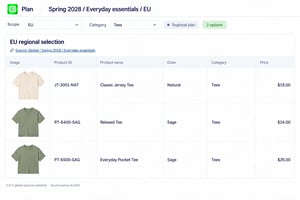
The EU regional selection, linked to the global Spring 2028 Everyday essentials source, with three options that keep the same product IDs, such as JT-3001-NAT and RT-6400-SAG.

Works alongside planning and development tools.

Create and evaluate your assortment in VibeIQ. Keep financial planning and technical development in your existing systems, with data shared through configured integrations or exports.

Planning
Sales, margin and inventory investment plans, forecasts and buy quantities
VibeIQ
Agreed product assortment creation and evaluation, with relevant commercial attributes
PLM
Technical development

Assortment management questions

What does assortment management cover in VibeIQ?

Creating, evaluating and refining the product set during line creation: choosing carryovers, developing new options, reviewing product mix, making additions and drops, and building regional or channel selections.

Can we begin before every product is designed?

Yes. Use placeholders to represent open product needs and record relevant attributes. Promote selected placeholders into products and options, then publish them into the assortment when they are ready to join it.

Can we compare different assortments?

Yes. Plan supports comparison with other plans or assortments. Teams can review differences and refine their selection. The comparison supports your judgment; it does not automatically choose the best assortment.

Does VibeIQ replace merchandise financial planning or PLM?

VibeIQ can work alongside both. Financial planning retains its agreed financial models, and PLM manages technical development. Define where products are created, who owns each field and how selected updates move between systems as part of implementation.

If your assortment planning application already owns product selection, agree which creation and review work belongs in VibeIQ. Data exchange with planning and PLM is defined through configured integrations or exports, with clear ownership of fields and decisions.

Does it optimize assortments or manage inventory?

VibeIQ supports merchant-led assortment creation and evaluation. Demand-based assortment optimization, size allocation, replenishment and in-season inventory management remain separate specialist workflows.

What happens when a product is dropped?

Drop the option in Plan and publish the change to remove it from the assortment. Connected review materials use that published selection, with lineboard refresh where required. Updates to external systems follow the integration or export process configured for your business.

What is the difference between assortment planning and assortment management?

Assortment planning usually sets the targets: how many options, at which price points, by category, channel or region. Assortment management in VibeIQ is the merchant-led work of building and refining the actual product set against those targets, including carryovers, new options, additions, drops and regional selections.

What is visual assortment planning?

Visual assortment planning means reviewing and shaping an assortment with product imagery alongside attributes such as price, category and color. Teams can judge balance, coverage and overlap as a set rather than row by row in a spreadsheet.

How can global brands keep regional assortments consistent?

Start regional and channel selections from one shared global line rather than separate files, so every region chooses from the same product records. Regions can add or drop options for their market, and global teams can review those selections instead of reconciling disconnected versions.

Put your next assortment decision to the test.

Bring one question: a gap to fill, an overlap to resolve or a change that creates too many updates. We’ll use your workflow to guide a VibeIQ walkthrough and discuss how the decision reaches the teams and systems that need it.