Skip to content
The VibeIQ Platform

Build the right product line before cost gets locked in.

Connect targets, product creation, market adoption, and sell-in in one live workflow.

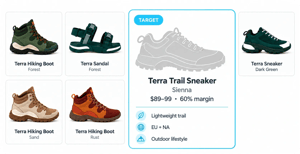
01-target-gap-identified-v3

Three applications, one connected product line.

Plan, Board, and Showcase support different parts of the season from the same evolving line.
Plan · Visual Line Planning
Turn targets into the actual line

Bring option counts, AUR, margin, timing, region, and channel targets into context, then fill planned needs with the products that make the set work.

plan-live-assortment-v4
Board · Design & Product Creation
Shape products in the context of the line

Develop briefs, concepts, colourways, and product direction against the needs of the full set, not in isolation.

board-product-direction-v3
Showcase · Sell-In & Market Review
Take the current line to every market

Build reviews and market-facing views from the live assortment, then capture selections and feedback without recreating the story.

showcase-market-review-v3

Build and evaluate the line as a set.

Start with commercial targets, build the actual line, evaluate the set, and decide what moves forward across markets.

Build the line

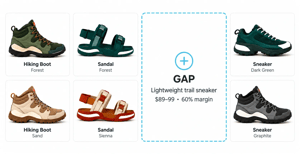
Build the line against targets before every product exists. Promote placeholders as products land, while gaps, duplication, and target variance remain visible.

01-target-gap-identified-v3
Target-backed placeholders
Start with open needs tied to option count, price, timing, region, or channel targets, then fill them as products take shape.
Live rollups against targets
See option count, price, units, margin, and mix against the sourced plan as products are added or changed.
Lifecycle visibility
See what is planned, in concept, in development, approved, or dropped without reconciling separate trackers.

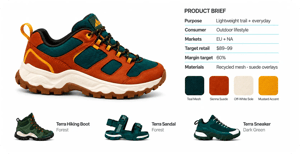
Brief & Shape

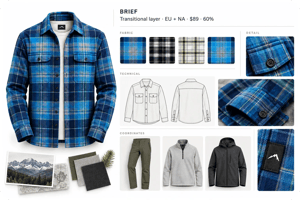
Tie briefs, concepts, and creative options to the products and open slots they are intended to fill. Feedback and changes stay tied to the current plan.

02-placeholder-created-v3
Living briefs
Keep commercial targets, product requirements, and creative direction tied to the product slot as the plan changes.
Concepts tied to open needs
Connect each concept to the product need it is intended to fill, so coverage and gaps remain visible.
Visual iteration and lineboards
Develop, recolor, compare, and present options from the current range without rebuilding review boards.

Evaluate & Decide

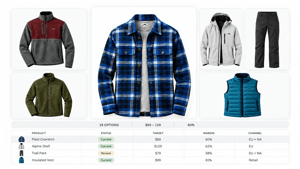
Compare products across category, channel, region, price, units, and margin. Cut duplication, adapt the mix, and decide what makes the assortment before more cost is committed.

03-concept-developed-v8
See the set as a whole
Evaluate breadth, coverage, price architecture, duplication, pairing, flow, and commercial targets across the line.
Drops, swaps, and approvals
Cut, adapt, swap, or approve products with the effect on the full line visible.
Decision history
Keep what changed, why, and where products were adopted attached to the line.

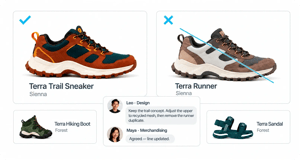
Adopt by market

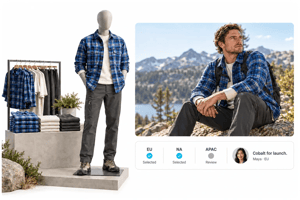
Give regional and channel teams the current global range to adopt and adapt. Their choices, concerns, and forecasts remain visible before commitments harden.

04-duplicate-removed-v8
Global-to-local assortments
Give each region or channel a governed view of the global range to adopt and adapt.
Adoption, concerns, and overrides
Capture what each market wants, what it rejects, and where it needs a regional or channel variation.
Central visibility before the buy
See adoption, quantities, forecasts, and unresolved risk across markets before commitments harden.

Review & Sell

Run line reviews, regional previews, buyer meetings, and sell-in from current product data and imagery. When the assortment changes, the presentation changes with it.

codex-image-21-sept-2026-11-19-30
Live review mode
Run reviews from the current range and make changes during the meeting without a post-review rebuild.
Buyer and account views
Create market-, channel-, or account-specific assortments from the approved range.
Presentations that stay current
Generate sell-in decks and line sheets from live product data and imagery, with PowerPoint or Excel exports when needed.

A better line leaves less to fix downstream.

Cut unnecessary options earlier, return time to product teams, and manage more complexity without adding the same level of cost.

Protect margin earlier
Catch over-assortment and margin exposure before they become development spend, inventory commitments, and markdown risk.
Return time to teams
Remove the hours spent rebuilding plans, reviews, and presentations so teams can spend more time shaping the product range.
Reduce late-stage waste
Make more decisions before samples, shoots, sourcing changes, and rework add cost.
Scale the operating model
Manage more products, regions, and channels without multiplying trackers, meetings, and manual coordination.

AI that starts with the line, not a blank prompt.

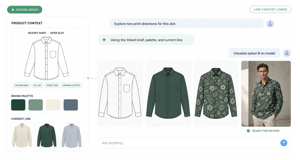
AI works from the product need, commercial targets, current line, and past decisions so teams can create and evaluate options in place.

Create against a real need
Generate concepts from briefs, references, brand assets, and the open needs in the line.
ai-starts-with-live-line-context-horizontal-v2
Iterate in place
Recolour, apply materials or prints, and refine options without creating another disconnected version.
Visualize the set earlier
See realistic products together before physical samples, shoots, or sell-in.

Common Questions

How do Plan, Board, and Showcase stay connected? They all work from the same evolving product and assortment data. A change to a product, target, status, visual, or decision can appear across every relevant view without rebuilding it elsewhere.
How does VibeIQ work with merchandise and range planning systems? Planning systems remain the source of commercial targets such as option count, units, AUR, margin, timing, region, and channel. VibeIQ brings those targets into context while teams build the actual product line and assortments. The resulting offering can then flow back into planning for forecast, depth, allocation, and buy decisions.
Does VibeIQ replace our PLM or planning systems? No. Planning systems set financial targets, while PLM and downstream systems manage approved products through development. VibeIQ connects the decisions that determine what moves forward, where it is adopted, and why.
Do we need to implement the whole platform at once? No. Teams can begin with one product range, workflow, or decision point, then expand across applications, teams, regions, and categories.
Does VibeIQ require us to use a specific AI model? No. VibeIQ can work with different approved models while keeping the product, brand, assortment, and decision context consistent.
Can VibeIQ work without a PLM? Yes. Where no PLM is in place, agreed products and decisions can move directly into development and other downstream workflows.

Put your current line to the test.

Bring a range plan or current line. We’ll show how VibeIQ connects the targets, product decisions, and handoffs around it.