
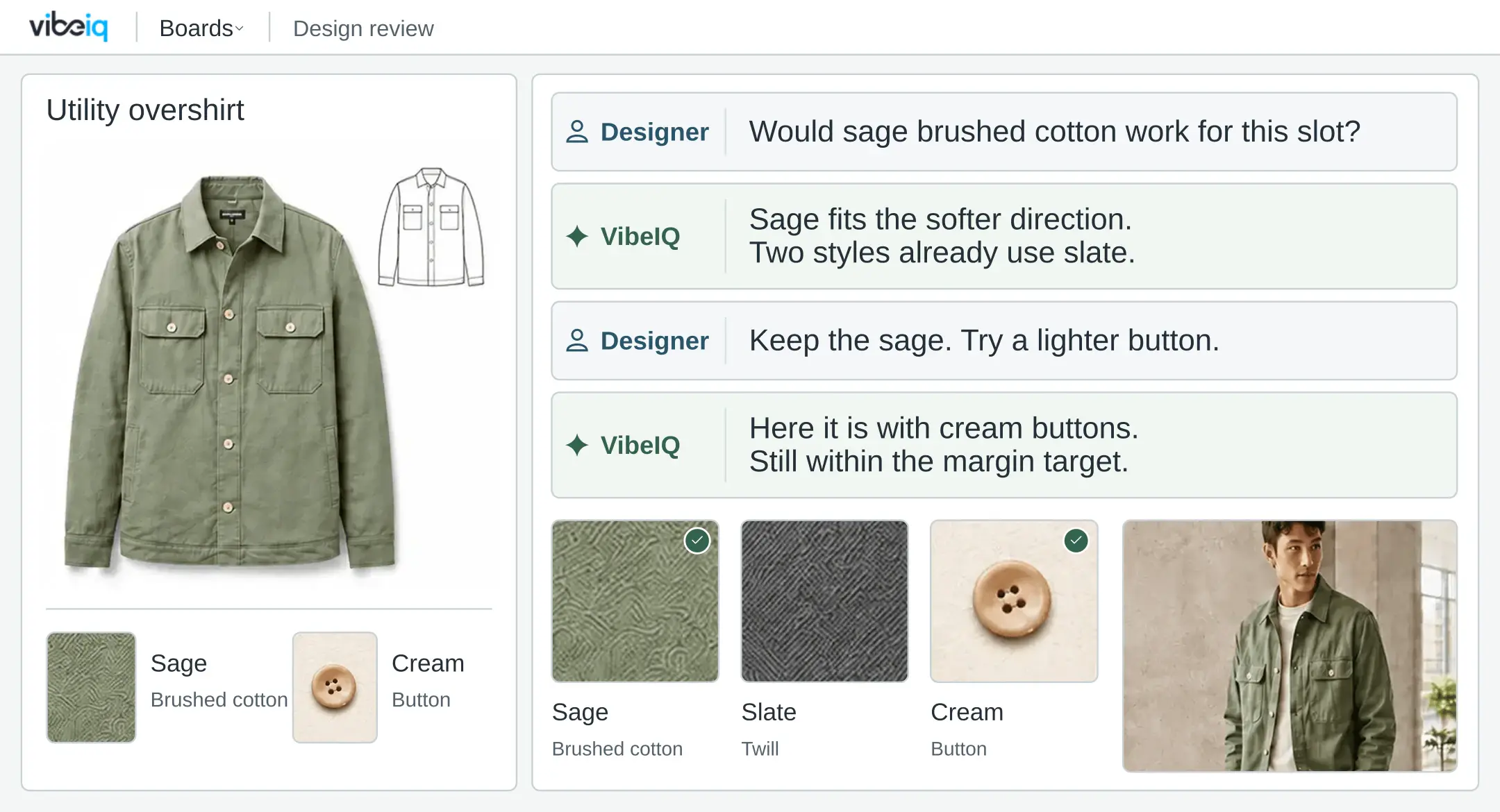
One designer with a good image generator can do remarkable work. They can turn out twenty directions before lunch, put a sketch on a model and test a print in five colorways. Then the brand tries to repeat that across the whole design team, and the results get much less impressive.
A PLM lead at a lifestyle apparel brand described the gap well. One person doing great image work "is not a scalable process." The value comes when "100 designers, 60 designers" can use it without learning to prompt, moving "from image to product" and "to specification as quickly as possible all within the context of your assortment."
This guide is about that shift. It covers what AI does well in product design today, what changes when a team uses it rather than one designer, a worked example of where images get stranded, the types of tools and when to choose each, and how to tell after one season whether it worked.
The jobs AI does today
AI is useful for six product design jobs right now. None of them removes the designer. Each moves the designer's time from producing to choosing and correcting.
| Job | Where it saves time | Where it still needs a designer |
|---|---|---|
| Concepts and ideation | Many directions from a brief, references and a mood board in minutes rather than days | Choosing what fits the brand and the line, and knowing when a direction has been done before |
| Sketch-to-render | Turns a line drawing into a realistic image for review without a 3D model or a sample | Proportion, construction details and anything the render invents that can't be made |
| Colorways and prints | Recolors and print variations across a style in a fraction of the time | Matching to the brand's real color standards and print scale, and judging the color story across the line |
| On-model and lifestyle images | Visuals for line reviews and sell-in before samples exist | Fit and drape, which an image can flatter, and brand standards for models and styling |
| Technical flats | Clean front and back views generated from an approved design | Accuracy of seams, trims and callouts, and final vectors in Illustrator |
| Early tech pack drafts | A starting structure with views, colorways and callouts that development can edit | Measurements, materials, construction and every number a factory will rely on |
Different tools suit different parts of this list. A director of design and development at a headwear and accessories company told us Firefly is "so attuned to the cad work in Adobe," while Midjourney "just wants to imagine things." Using several tools side by side is fine for an individual and a problem for a team.
What changes when a team uses it
When one designer uses AI, the image is the output. When a team uses it, the image is an input to a line that merchandising will review and development will build. Six things change.
Brand consistency and the brand's own libraries
A team needs outputs that look like the brand, not like the model's default taste. That means generation grounded in the brand's own colors, materials, silhouettes and past products, ideally from the libraries the team already maintains. Raspberry AI, Fermat and Mercer all now offer custom models or styles trained on a brand's own references. Ask whether those models stay current as your libraries change, and who owns them.
IP and training data
This is where individual use and team use diverge most. A business analyst at a drinkware brand put the concern simply: "we don't want our items to be part of the model to then get leaked." Read the vendor's terms, not just the marketing page. Raspberry AI says customers keep ownership of what they create and that uploads aren't used to train models for anyone else; Fermat says its models don't train on customers' creations; Mercer says it doesn't use customer data to train its foundational models. Each of those statements is narrower or broader in its own way, and your legal team should read the contract language.
Review and approval
One designer approves their own work. A team needs to know who approved a concept, against what brief, and what changed since. If approvals happen in comments on exported images, there is no record once the image is reused somewhere else.
Where outputs live
Generated images tend to scatter: one tool's history, a downloads folder, a shared drive, a board, a deck. Agron's VP of Design described what happens when an image has to fit a 16:9 board frame: the team has to "take the image out and run it through another generator," and once the image lands on a board, the prompt and history are gone. "You kind of lose all the effort that went into building it and you have to start all over again."
What merchants see
Merchants don't review images. They review products against a plan: price, margin, option count, duplication, coverage. If the concept arrives as a picture, someone has to turn it into data. A director of product merchandising at a footwear brand described screenshotting a design and putting it "into chat and having it spit out in excel" to match AI output to spec sheets. That works, and it shows exactly where the information is missing.
What development inherits
Development needs the concept plus everything decided about it: the colors by library reference rather than by eye, the intended material, the price slot, the target cost and the open questions. If they inherit only the image, they rebuild the rest, and some of the original intent is lost in the rebuild.
A worked example: one brief, three handoffs
Take a fall knitwear brief: six new sweater options to fill a $98 to $148 price band, in the season's color palette, alongside two carryover styles.
1. Concepts. A designer generates about 40 directions from the brief, a mood board and a few archive references, then picks nine. The first stranding point is right here: the prompts, references and color choices that produced those nine stay in the generator's history, attached to nothing.
2. Line review. The nine concepts go onto a board next to the carryover styles and the six open slots. The merchant spots that two concepts duplicate the carryover crew at the same price, and that nothing sits at the $148 top of the band. Three are cut, two are recolored and one is moved up the ladder. The second stranding point: the images were cropped and regenerated to fit the board, and the reasons for each cut live in the meeting notes.
3. Development. Six adopted concepts move to development. A developer opens the images and starts filling in a spec template: category, yarn, gauge, colors, price slot, target cost. Most of that was known in step 2, but it was never attached to the product, so it gets re-keyed from screenshots and memory. The third stranding point is the one that costs money: a recolor agreed in the review is missed and sampled in the old color.
What has to travel with the image to avoid all three:
| What travels | Why it matters |
|---|---|
| Prompt, references and author | So a concept can be revised without starting over |
| Colors as library references | So recolors match the palette and development orders the right shade |
| Product attributes and price slot | So merchants can check the line against the plan |
| Decision and reason | So cuts and changes aren't reopened later |
| Open questions and owner | So development knows what's settled and what isn't |
The broader argument for why concepts need a place in the line is in AI Can Generate the Image. Can Your Team Build the Product? The practical point here is narrower: decide where each of those five things lives before you roll AI out to the team.
The kinds of tools, and when to choose each
Vendor details below are taken from each vendor's own site, as of November 2026. For a vendor-by-vendor review, see Best AI Fashion Design Tools for Brand Teams (2026): 9 Compared.
General image generators
ChatGPT, Midjourney, Firefly and similar tools. Broad, fast and cheap per seat, with no fashion-specific vocabulary or brand libraries built in, and outputs that live as files.
Choose them when you need inspiration, mood and quick visuals for one person at a time, and you have a clear policy on what can be uploaded.
Fashion-specific AI
- Raspberry AI: sketch-to-render, colorways and prints, on-model and lifestyle imagery, shared boards, and AI agents. Custom-trained models on a brand's colors, silhouettes and approved models.
- Vizcom: sketch-to-render with live rendering and rotatable 3D, aimed at industrial design, footwear and other physical product designers.
- Fermat: a toolbox of fashion AI tools (sketch-to-render, garment edits, materials and prints, virtual try-on), custom styles, bulk processing and a no-code tool editor.
- Mercer (formerly CALA): AI design with custom models trained on a brand's references, asset management, comments and measurements on design files, and production management on enterprise plans.
- Style3D: generative AI tools for ideation and visuals alongside Style3D's 3D garment simulation software.
- CLO AI Studio: AI rendering features inside CLO's 3D garment software (labeled beta), such as compositing a model onto a realistically rendered garment.
Choose them when design visualization is the main job, you want fashion vocabulary and controls, and you're prepared to connect the outputs to your line and development process yourself.
When Raspberry AI or Vizcom are the right pick: if your design team wants the broadest fashion-specific image toolkit, works across apparel, footwear, accessories and marketing imagery, and your line and assortment work already happens somewhere else that you're happy with, Raspberry AI or Vizcom are a strong choice.
PLM vendors' AI
PLM vendors are adding generation to their suites. Centric Software launched Centric AI Studio in May 2026, integrated with Centric PLM, for concepts, colorways, product variants and imagery tied to PLM data.
Choose it when your team already works daily in that PLM, most products exist as PLM records early, and keeping one vendor matters more than where merchants and designers do their early line work.
Product line creation platforms
Platforms where merchandising, design and development build the line together, with AI generation inside the same workspace and concepts saved as products on the line.
Choose one when the problem isn't making images but getting the right ones into the line: designers and merchants review concepts together against the plan, regional and channel versions of the line matter, and development needs concepts to arrive as products rather than pictures. For the design collaboration side of this (Adobe, whiteboards, 3D), see Design Collaboration Platforms for Apparel and Footwear Brands.
Demo tests worth running
Bring one of your real briefs and run the same tests with every vendor:
- The brief test. Generate concepts from your brief, your references and your palette. Do the outputs use your actual colors, or close guesses?
- The line review test. Put the chosen concepts next to your carryover and open slots. Can a merchant see price, category and duplication without a separate spreadsheet?
- The change test. Cut one concept and recolor another in the review. Does every board and presentation that shows them update, or do you rebuild?
- The handoff test. Ask what development receives for an adopted concept. Is it an image, or a product with attributes, colors, decision history and open questions?
- The history test. Two weeks later, can someone see the prompt, references and author for any concept?
- The IP test. Ask for the contract clause on training data and ownership, not the website summary.
- The scale test. Have a designer who has never prompted try it for ten minutes. A team needs tools that work for its least technical member.
Mistakes to avoid
- Counting images as progress. Generating 400 concepts is easy. If the line review still cuts the same proportion and development still re-keys, nothing improved. See Why More Concepts Won't Fix Assortment Planning.
- Judging on image quality alone. Generation quality is converging across tools. Today's gap in render quality will be smaller next year; the gap in where outputs live and what travels with them won't close on its own.
- Skipping IP terms. Pilots often start on a credit card before legal has read anything. Get the training-data and ownership terms agreed before your archive and unreleased designs go in.
- Piloting with your most enthusiastic designer only. They'll succeed with almost anything. Pilot with a category team, including the merchant.
- A different tool per designer. It feels flexible and leaves outputs in five places with five sets of terms.
How to measure success after one season
Take a baseline from last season before you start, then compare these:
- Concept adoption rate: adopted products as a share of concepts that reached a line review. Rising is good; generated volume alone is not.
- Samples cut after request: fewer samples for styles that are dropped means decisions are happening earlier.
- Time from brief to first line review: AI should shorten this for the whole category team, not just the designer.
- Re-keying: how often information about an adopted product is typed a second time, and by whom.
- Complete handoffs: the share of adopted products that reach development with attributes, colors and decisions attached.
- Breadth of use: how many designers used AI on live work in the season, not how many have a login.
Where VibeIQ fits
Image generators edit images; VibeIQ creates products. VibeIQ is an AI-native product line creation platform where merchandising, design and product development shape the line and create the products on one shared product record, measured against the plan's targets.
Image Gen, VibeIQ's AI image generation, handles concept generation, sketch-to-render and recolor on the board, in the context of the line. Design Studio is where designers edit and finish selected images. Concepts save to the product record and to the item, asset and color libraries, and every image keeps its prompt, references, colors and author. Merchants review concepts next to the rest of the line and the plan's targets in the same workspace, and the product record is what specs and tech packs are built from.
VibeIQ is open to your own AI. Any AI model can read and write the line through VibeIQ's open API and MCP, under the same product types, validations and permissions as your team. Our view of agents is simple: agents draft, people approve. Agents that draft line reviews and specs for people to review are the direction we're building in. Designers keep Illustrator, Photoshop and 3D tools for precision and finishing. At New Balance, the team reports about 12 weeks returned per designer per year. See the AI product design page for more.
Bring one real brief and we'll run it through to a line review with your team. Book a working session.